How to set up entry fees in RegattaHub
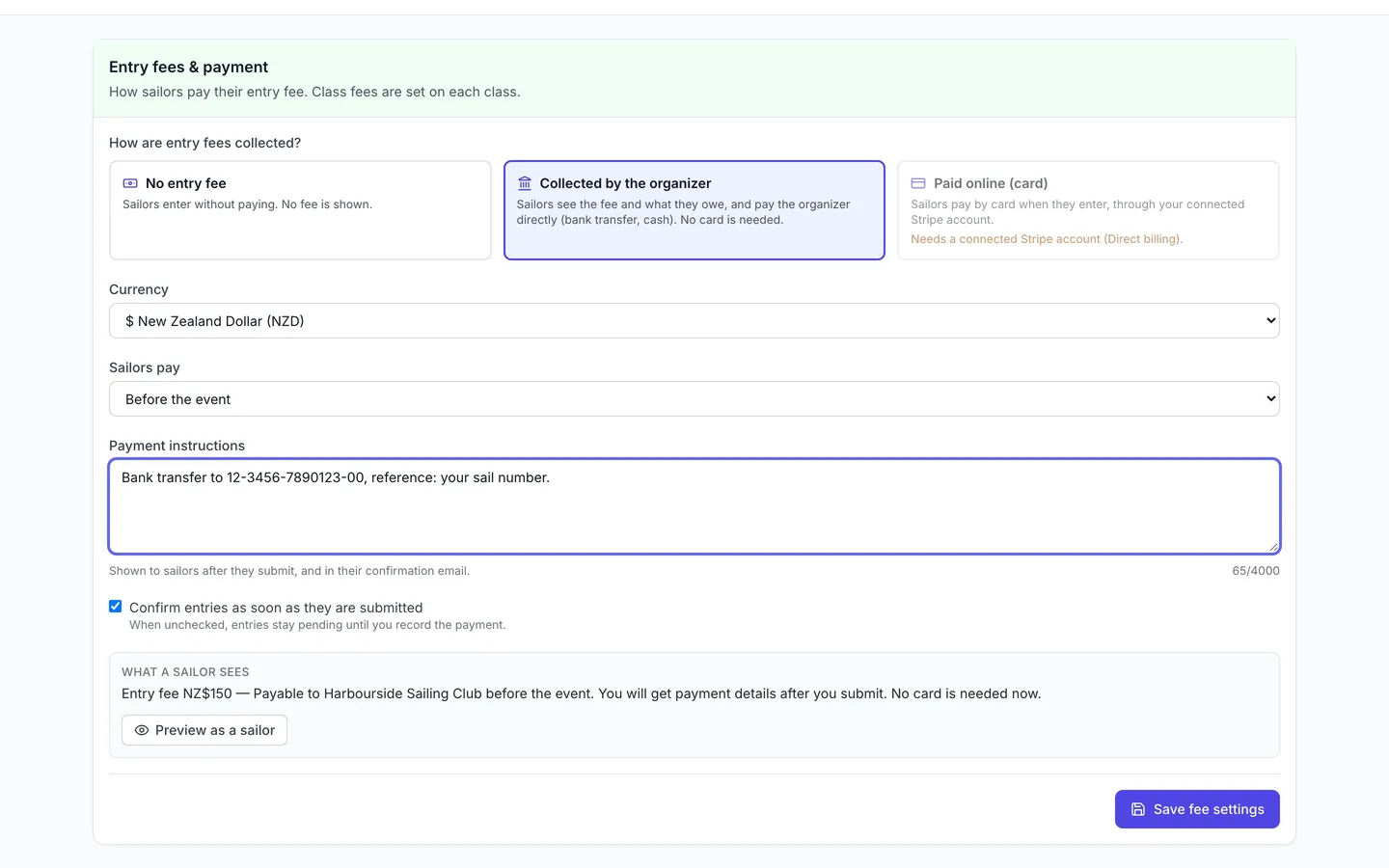
RegattaHub gives you three ways to handle entry fees: no entry fee, collected by the organizer (sailors pay you directly by bank transfer or cash, no card needed) or paid online by card. Each class sets its own fee, and sailors always see exactly what they owe.
Some events take entry fees by card as sailors enter. Many clubs would rather be paid by bank transfer, cash at check-in or through their own club system, and still want every sailor to see what they owe. RegattaHub handles both, as well as events with no fee at all.
Three ways to handle entry fees
| Option | What sailors see | Good for |
|---|---|---|
| No entry fee | No fee is shown. Sailors enter without paying. | Free events and club racing. |
| Collected by the organizer | The fee and what they owe, your payment instructions once they have entered, and no card form. | Bank transfer, cash or cheque. No Stripe account needed. |
| Paid online (card) | A card payment as they enter. | Payment up front. Needs the regatta to accept payments via RegattaHub (a connected Stripe account). |
The RegattaHub fee. When a regatta accepts payments via RegattaHub, the $5 per entry fee applies to every entry in it, including free entries and entries paid later or to the organizer. A regatta that doesn't accept payments via RegattaHub, such as one where you collect every fee yourself, has no RegattaHub fee. See pricing.
1. Set each class's fee
Entry fees belong to classes, so a double-handed class can cost more than a single-handed one. Enter the Entry Fee when you add a class while creating the event, or later on the Circles & Fleets tab by editing the class. Leave it blank for a free class.
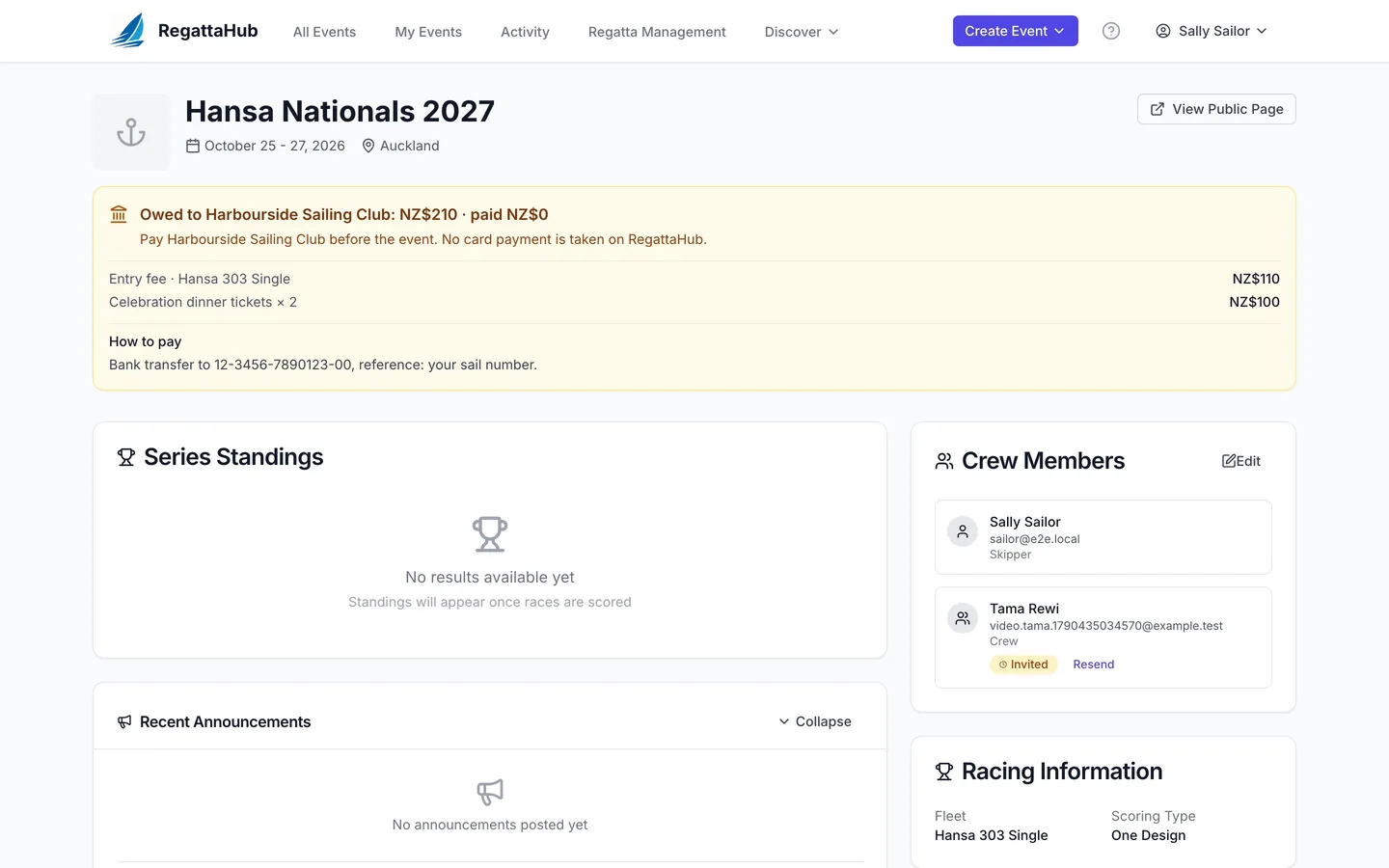
Sailors see each fee in the class list as they enter, for example Hansa 303 Single · NZ$110.
2. Choose how fees are collected
- Open your regatta. The Entry fees & payment card is on Edit Event Details, and on the Payments tab for events that don't take card payments.
- Under How are entry fees collected?, choose No entry fee, Collected by the organizer or Paid online (card). Paid online is available only when the regatta accepts payments via RegattaHub, with a connected Stripe account; a regatta set up to sell products only can't use it.
- Check the Currency.
- For fees collected by the organizer, set Sailors pay to Before the event, At check-in or Not specified.
- Write the Payment instructions, for example Bank transfer to 12-3456-7890123-00, reference: your sail number. Sailors see them after they submit, and in their confirmation email.
- Decide on Confirm entries as soon as they are submitted. Ticked, entries are accepted straight away. Unticked, they stay pending until you have been paid.
- Read the What a sailor sees line: it is the exact wording sailors get. Press Preview as a sailor to see the whole entry form.
- Press Save fee settings on the Payments tab, or Save Changes on Edit Event Details.
3. What sailors see
With fees collected by the organizer:
- Each class in the class list shows its fee.
- Once they choose a class, a box shows the Entry fee and, for example, "Payable to Harbourside Sailing Club before the event. You will get payment details after you submit. No card is needed now." The payee is the regatta's Venue (from the event details), or "the organizer" if none is set.
- The summary lists the entry fee, any priced extras and the total Owed to Harbourside Sailing Club.
- The button reads Submit entry, never "Continue to payment", and it opens the sailor's entry page rather than a payment page.
- The entry page shows what is owed and paid, and your instructions under How to pay. The confirmation email includes the same instructions.
With Paid online (card), submitting the entry opens a payment page where sailors pay by card, or choose Pay Later. Any priced extras they chose are included in the amount. If the regatta has an event store, sailors can also pick store items on the entry form and pay for them with the entry; a complimentary entry covers the entry fee only.
4. Record payments as they arrive
- Open the Entries tab. Each boat shows what it owes and what has been paid. Press Unpaid to list only boats with money still due.
- Open an entry with its edit button.
- The entry lists what is owed, line by line. Enter the Amount paid, or press Mark as paid to record the balance. RegattaHub records who marked it and when.
- Add a Payment note if it helps, for example Bank transfer 3 Oct, and press Save Changes.
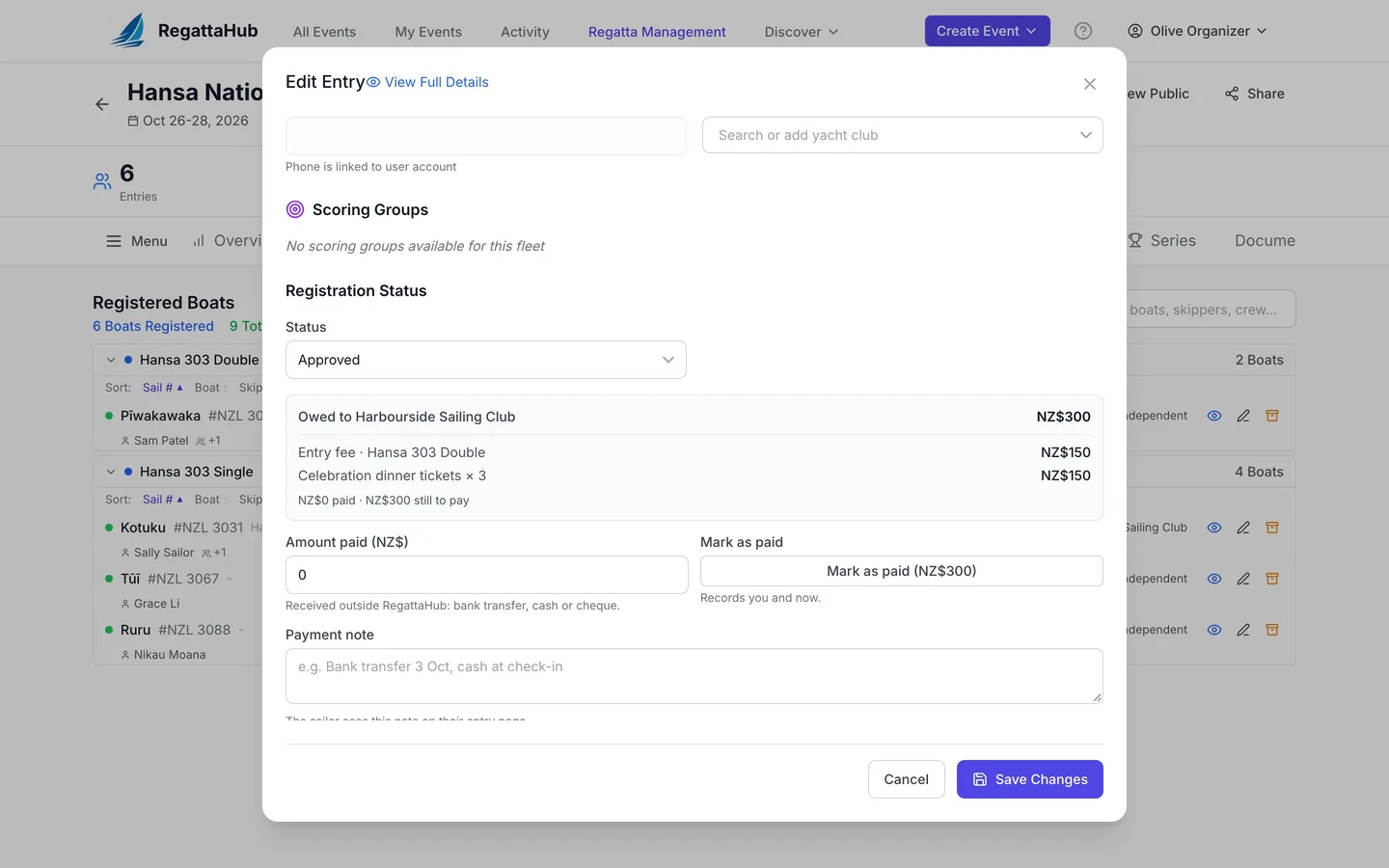
If entries wait for payment (you unticked Confirm entries as soon as they are submitted), change the entry's Registration Status to Approved in the same window once the money has arrived.
For a spreadsheet view of every entry with its Owed, Paid and Balance, and a CSV export, see Advanced mode.
Every field and status is covered in the Help Center: Recording Payments and Marking Entries Paid.
Frequently asked questions
Do sailors need a card when the organizer collects the fee?
No. With Collected by the organizer, sailors see the fee and what they owe, submit their entry without a card, and get your payment instructions on their entry page and in their confirmation email.
Is there a RegattaHub fee when I collect entry fees myself?
Only if the regatta also accepts payments via RegattaHub: then the $5 per entry fee applies to every entry, including free entries and entries paid later or to you. A regatta that does not accept payments via RegattaHub has no RegattaHub fee.
Where do sailors see my payment instructions?
After they submit: on their entry page under How to pay, and in their confirmation email. The entry form itself only says who to pay and when.
Can entries wait until they have paid?
Yes. Untick Confirm entries as soon as they are submitted. Entries then stay pending until you have been paid; set the entry to Approved when you record the payment.
How do I see who still owes money?
Open the Entries tab and press Unpaid, or use the Unpaid filter in Advanced mode, which also shows Owed, Paid and Balance for every boat and exports to CSV.
Related guides
- → Build your registration form: sections, follow-ups, extras Sections, questions for each sailor, follow-ups that appear only when they apply, priced extras, and Preview as a sailor.
- → Advanced mode: every answer, payment and rating Every entry’s answers, owed and paid, and ratings in one grid: edit in place, total the extras, export to CSV.
- → Crew invitations: adding crew and their own answers How skippers add crew, what the invitation email does, and how crew answer their own questions when they accept.
First regatta free
No monthly fees. No commitment. Try RegattaHub on a real event at zero cost.
Go to App