How to score handicap classes with Portsmouth, IRC or your own rating formula
Choose RYA Portsmouth or IRC as a class’s rating system, or write your own rating formula with its own rating name and usual range, checked before a race is scored. Sailors give their rating when they enter, and you can correct it in Advanced mode.
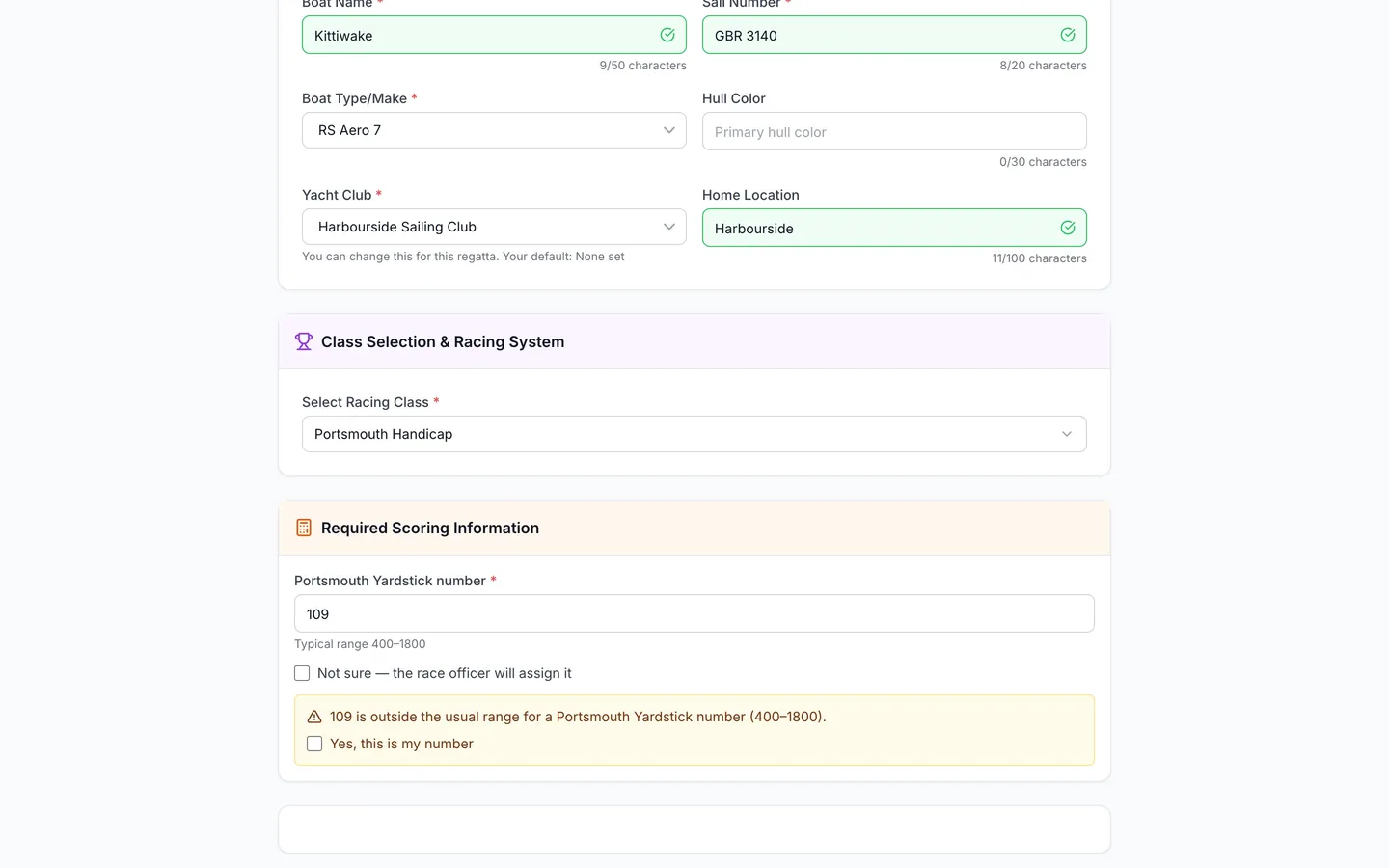
A handicap turns each boat's elapsed time into a corrected time using its rating, and places are decided on corrected time. RegattaHub has PHRF and ORC, plus RYA Portsmouth and IRC, and lets you write your own formula for a club handicap.
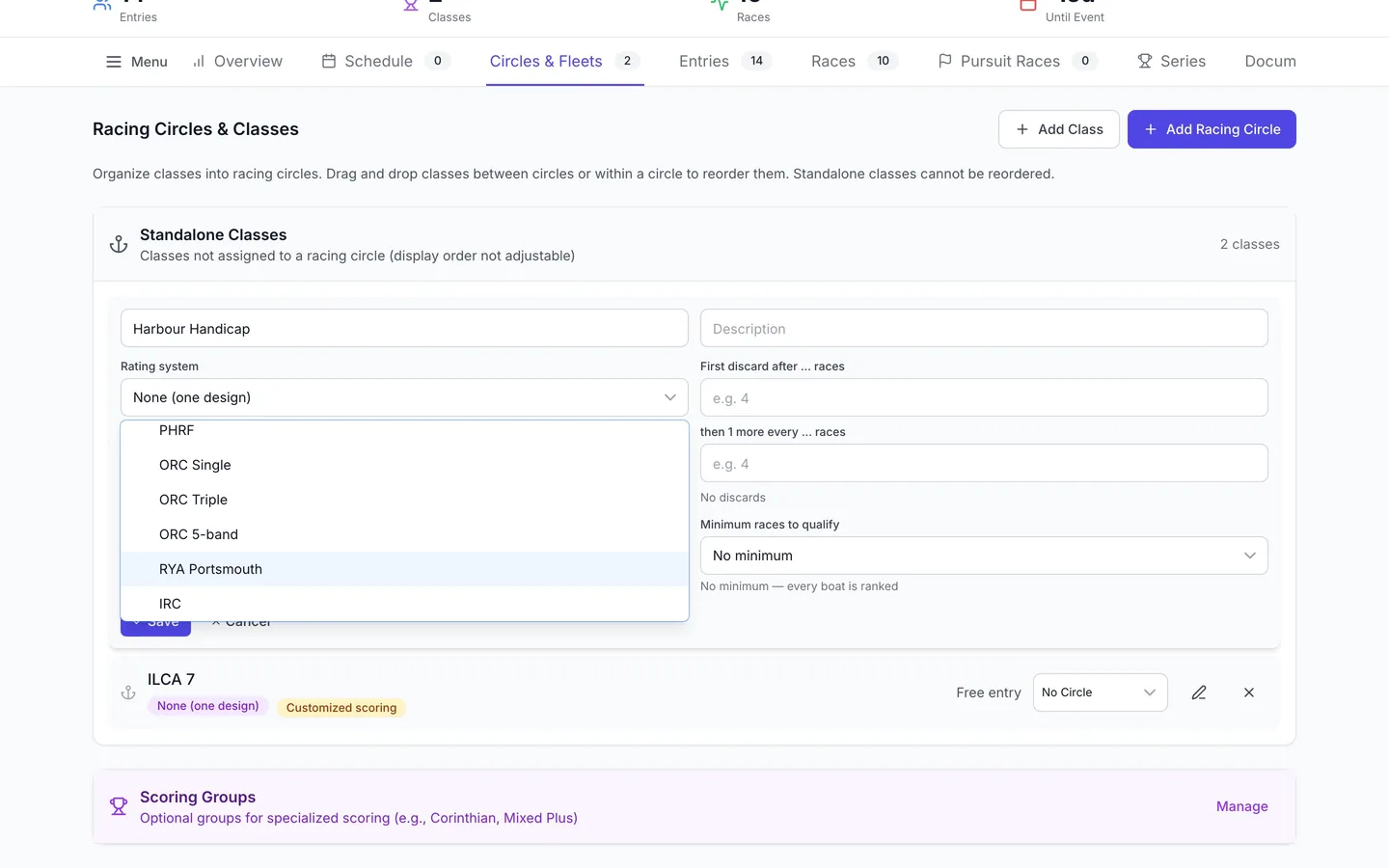
RYA Portsmouth and IRC
On the Circles & Fleets tab, edit the class and set Rating system to RYA Portsmouth or IRC. Both are rating systems, not customizations, so the class stays on default scoring.
| Rating system | Corrected time | Rating | Usual range |
|---|---|---|---|
| RYA Portsmouth | e × 1000 ÷ r | Portsmouth Yardstick number | 400–1800 |
| IRC | e × r | IRC TCC | 0.7–1.8 |
Here e is the elapsed time and r the boat's rating. For example, 1:02:30 elapsed with a Portsmouth number of 1085 → 57:36 corrected, and 1:02:30 elapsed with an IRC TCC of 1.05 → 1:05:38 corrected. Corrected times are rounded to the nearest whole second, and half a second rounds up.
Your own rating formula
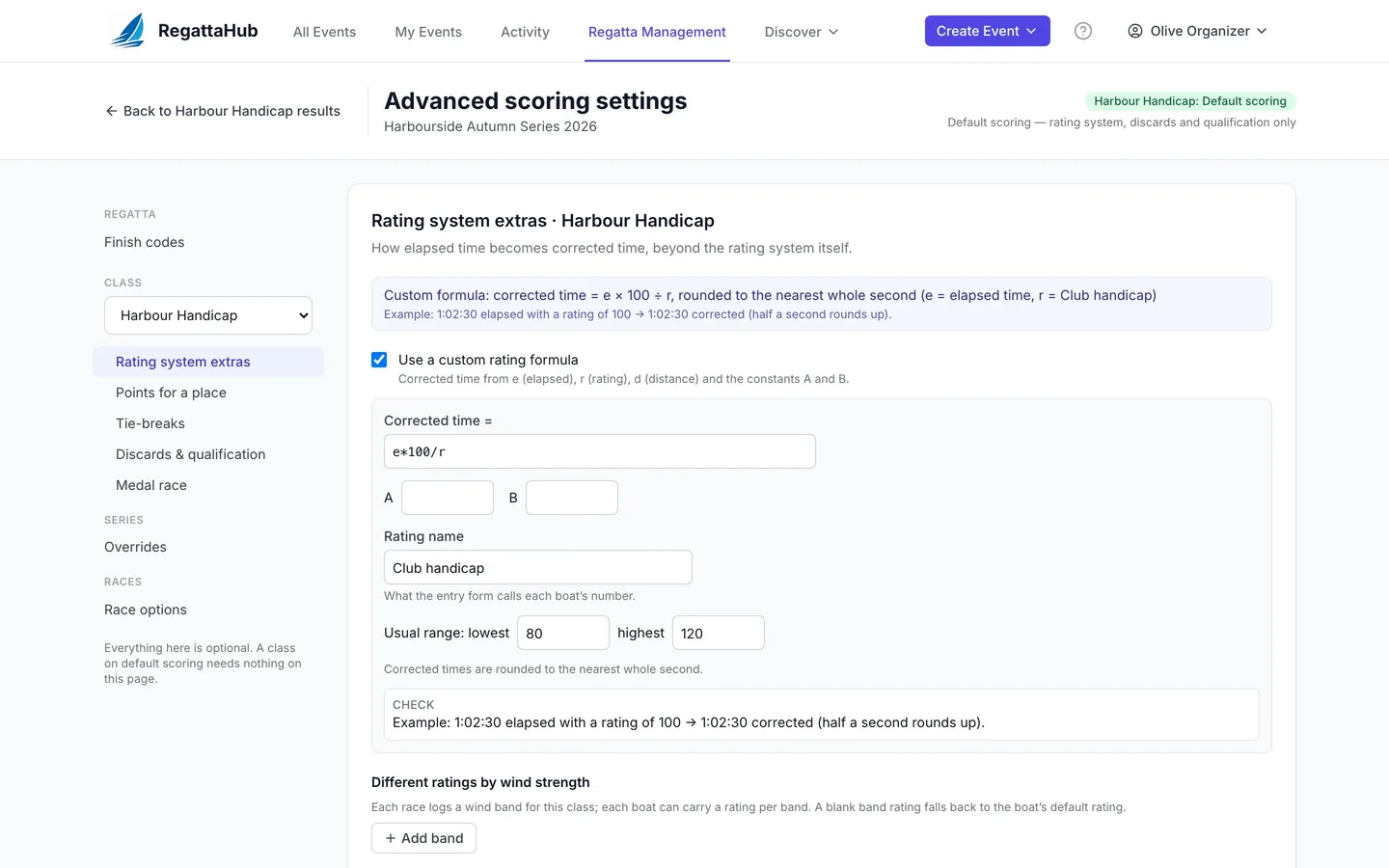
- Open Advanced scoring settings, choose the class, then Rating system extras.
- Tick Use a custom rating formula.
- Next to Corrected time =, write the formula using:
e: the elapsed time,r: the boat's rating,d: the race distance in nautical miles (optional),AandB: constants you enter in the boxes below,- numbers,
+ − × ÷and brackets.
- Enter a Rating name, for example Club handicap. It is what the entry form calls each boat's number.
- Enter the Usual range: the lowest and highest rating a boat in this class would normally have, for example 80 and 120. It is required: RegattaHub uses it to test the formula before any entries arrive, and to ask sailors to double-check an unusual number.
- Read the Check panel. It works an example with your formula, for example Example: 1:02:30 elapsed with a rating of 100 → 1:02:30 corrected.
- Press Save & rescore.
Examples
| Formula | What it does |
|---|---|
e*100/r | A handicap around 100: a boat rated 100 keeps its elapsed time; a boat rated 80 has it multiplied by 1.25. |
e*r/100 | The opposite: a boat rated 110 has its time multiplied by 1.1. |
e*A/(B+r) with A = 650, B = 550 | Time on time with constants, in the style of PHRF time on time. |
e-r*d | Time on distance: the rating is seconds per mile, taken off for each mile sailed. Needs each race's distance. |
What RegattaHub checks
A formula is checked across the usual range, distances and elapsed times before it can be saved. It is refused if:
- It can't be read: The rating formula can't be read: Unexpected end of expression at position 2.
- A corrected time could drop below zero, for example
e - 60*rwith a usual range of 80–120: At rating 80 with 10:00 elapsed the corrected time would be -4200 seconds; it must stay above zero. - A slower boat could get a better corrected time, for example
r*100/e: The formula divides by e (elapsed time), so a slower boat would get a better corrected time. Write it ase × (…)ore − (…), witheused once. - It uses
AorBwithout a value: The formula uses A but no value for A is set. - The corrected time would be less than 0.01 × or more than 100 × the elapsed time, which usually means the formula is upside down or the range is wrong.
- There is no usual range: A rating formula needs the usual range of its ratings (lowest and highest); without it the formula cannot be checked before entries arrive.
- It uses
dwhile a finished race of the class has no distance.
How sailors enter their rating
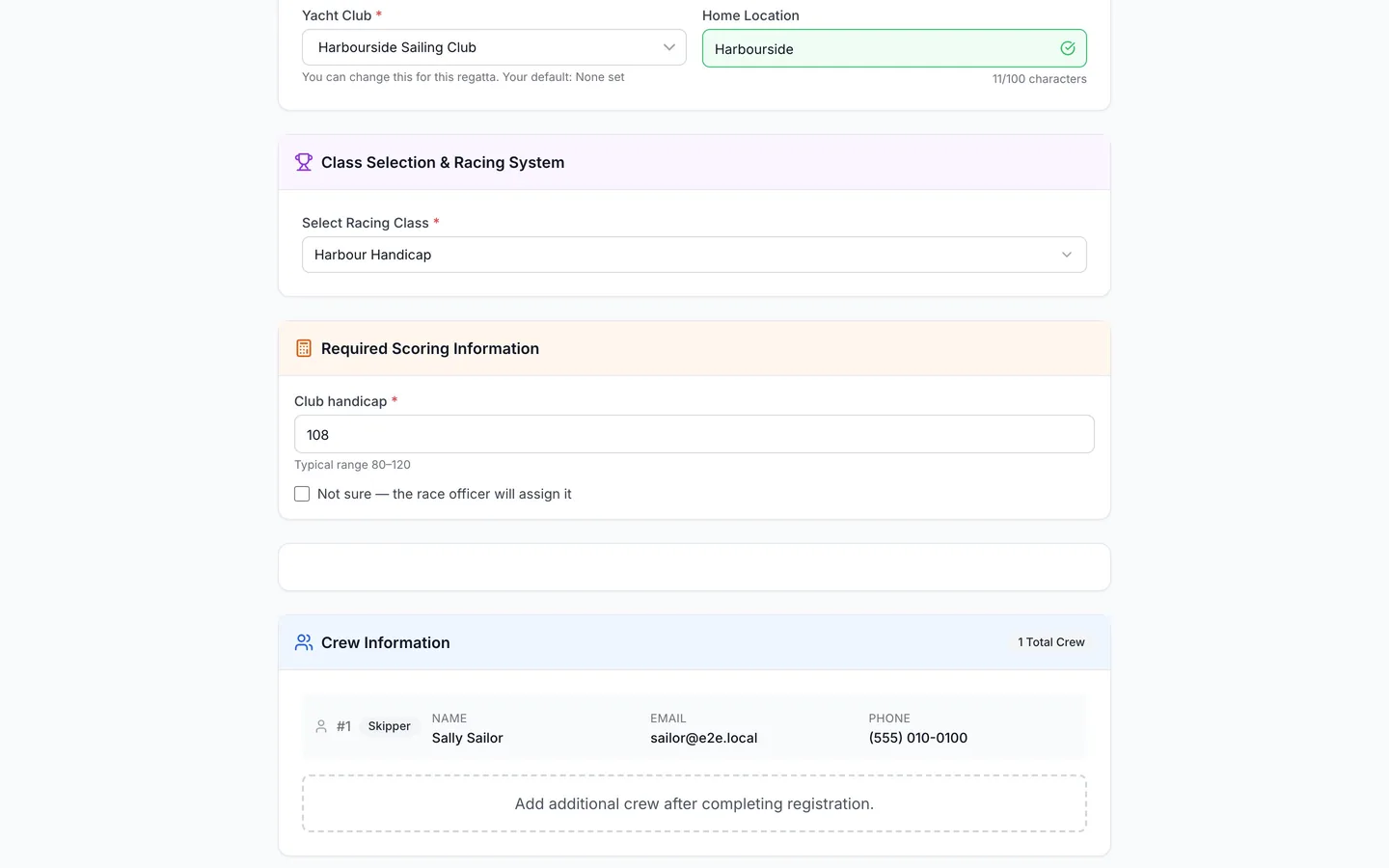
Whenever a class's rating system needs a number, the entry form asks for it under Required Scoring Information, labelled by the rating (for example Portsmouth Yardstick number or your rating name), with the usual range as a hint. Sailors can instead tick Not sure — the race officer will assign it.
A number outside the usual range isn't refused, because real ratings vary. The sailor is asked to check it, for example 109 is outside the usual range for a Portsmouth Yardstick number (400–1800), and ticks Yes, this is my number to keep it. The number appears on their entry page under Handicap Ratings.
Organizers can add or correct ratings in Advanced mode, in the entry editor, in the ratings panel, or with a bulk upload that has a Rating column (and Rating:<band> columns for wind bands). Changing a rating recalculates the class's finished and published races.
How corrected time is worked out
- Each finisher's elapsed time comes from the class start and their finish time.
- The rating system's formula turns it into a corrected time, rounded to the nearest whole second (half a second rounds up).
- Places are decided on corrected time, then points for a place are applied.
Example. With e*100/r, Puffin (Club handicap 106) sails 57:43 and corrects to 54:27; Quicksilver (97) sails 53:15 and corrects to 54:54. Puffin wins on corrected time although Quicksilver finished first.
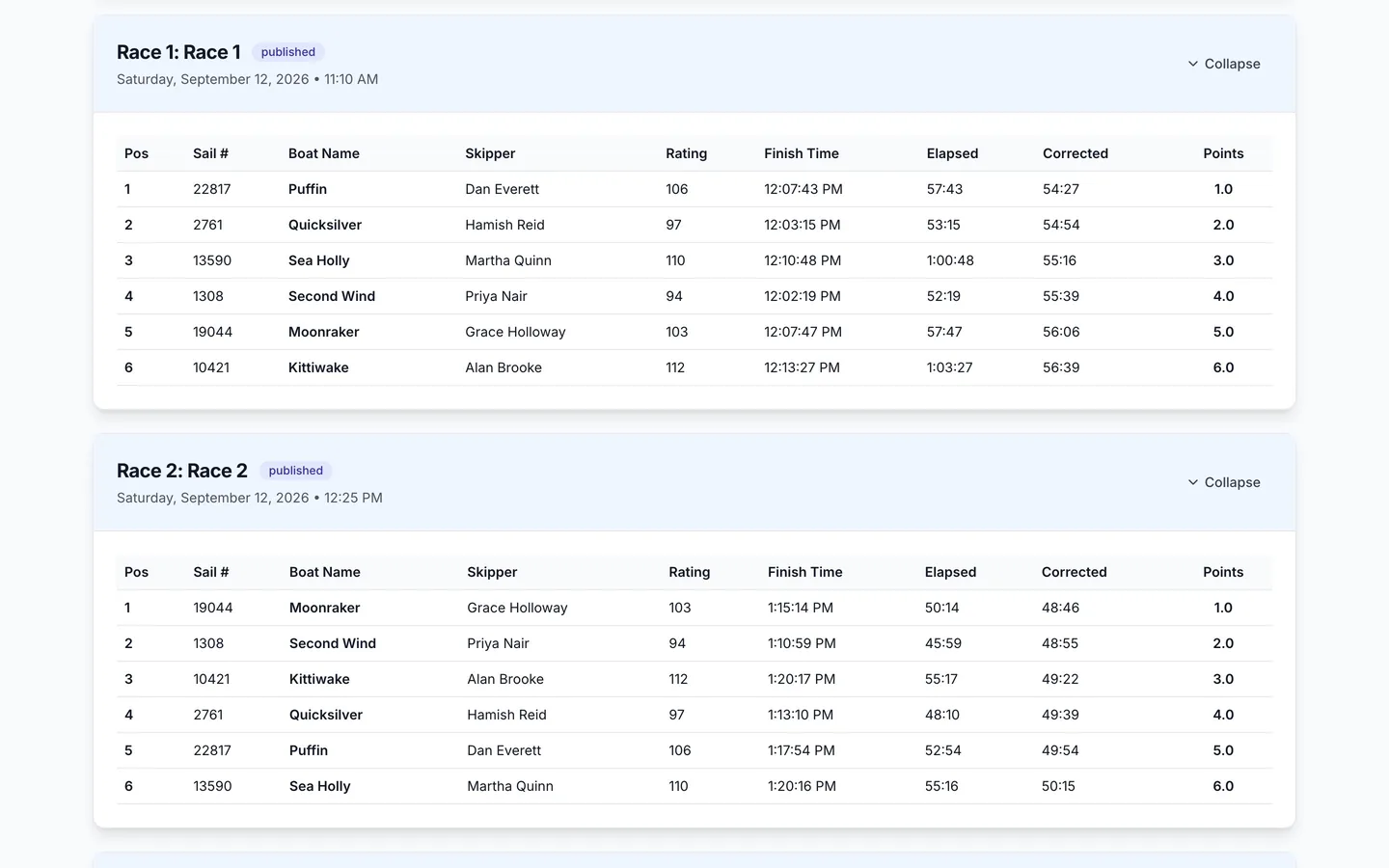
In finish entry, the Rating column shows the rating used. In a RYA Portsmouth, IRC or custom-formula class you can override one boat's rating for a single race: click the rating, and the boat's usual rating shows struck through until you clear the override. If the formula uses d, enter each race's Distance for the class in Race Parameters.
A race can't be published while a finisher has no rating, a distance is missing, or a corrected time can't be worked out properly. RegattaHub says which boat and why (see scoring warnings).
Wind bands and different lap counts
- Different ratings by wind strength (RYA Portsmouth, IRC and custom formula classes): add wind bands in Rating system extras. Each boat can carry a rating per band, and each race records its band for the class in Race options. A blank band rating falls back to the boat's normal rating.
- Boats may sail different numbers of laps (any class): each boat's time is scaled to the most laps sailed before correction, and finish entry gains a Laps column.
Frequently asked questions
Does RegattaHub support the RYA Portsmouth Yardstick?
Yes. Set the class’s Rating system to RYA Portsmouth. Corrected time is elapsed time × 1000 ÷ the Portsmouth number, rounded to the nearest whole second, and sailors give their Portsmouth Yardstick number when they enter.
Can I use IRC ratings?
Yes. Set the class’s Rating system to IRC. Corrected time is elapsed time × the IRC TCC.
Can I write my own handicap formula?
Yes. In Advanced scoring settings › Rating system extras, tick Use a custom rating formula and write corrected time in terms of e (elapsed time), r (rating) and d (distance), with constants A and B. Give the rating a name and its usual range.
Why was my rating formula refused?
RegattaHub refuses a formula that can’t be read, that could give a slower boat a better corrected time, that uses A or B without a value, that gives implausible corrected times, or that has no usual range. The message says which.
What if a sailor doesn’t know their rating?
They can tick Not sure — the race officer will assign it. Enter the rating later in Advanced mode or the entry editor. Results with a finisher who has no rating can’t be published until it is entered.
Related guides
- → Advanced mode: every answer, payment and rating Every entry’s answers, owed and paid, and ratings in one grid: edit in place, total the extras, export to CSV.
- → Scoring warnings: why publishing can be blocked What stops a race from being published, what the warnings mean, and how to fix them.
- → Advanced scoring settings: what stays default and where What default scoring covers, where the Advanced scoring settings link is, and how saving, previews and history work.
- → Practice races and other race options Practice races that don’t count, races that can’t be discarded, discard-first races and wind bands.
First regatta free
No monthly fees. No commitment. Try RegattaHub on a real event at zero cost.
Go to App