Scoring warnings: why RegattaHub can stop a race from being published
RegattaHub never publishes a result it can’t score properly. If a finisher has no rating, a distance is missing or a corrected time can’t be worked out, publishing stops and says which boat and why. Your results are kept as a draft until you fix it.
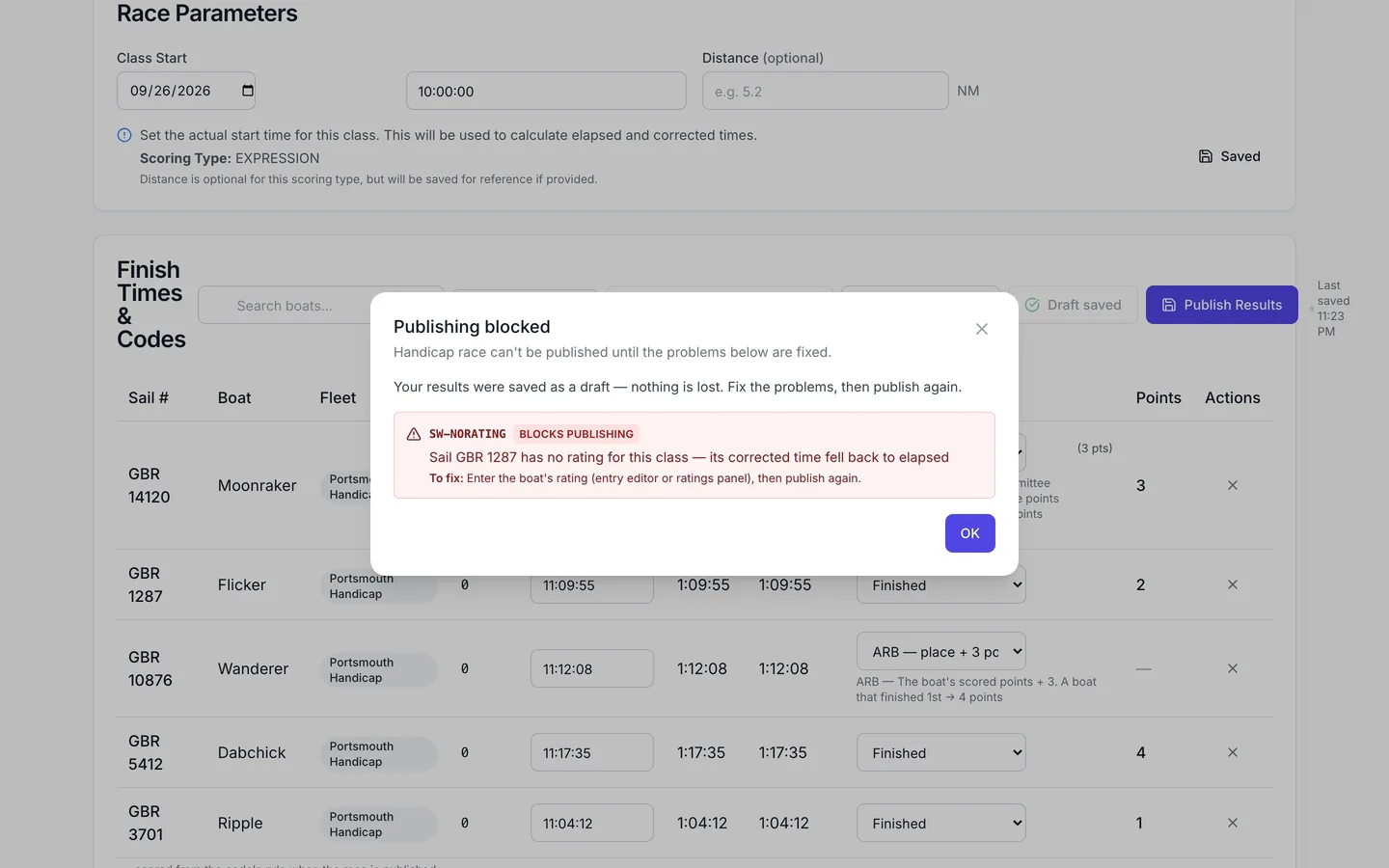
Most results never raise a warning. They come up when something the scoring needs is missing or doesn't add up, usually with handicap classes. Instead of guessing (scoring a boat on elapsed time, say) and publishing a wrong order, RegattaHub stops and tells you.
When publishing is blocked
If you press Publish Results and a problem blocks it, a Publishing blocked dialog says "… can't be published until the problems below are fixed" and lists each problem with the boat and a To fix line. Your results were saved as a draft: nothing is lost. For example:
SW-NORATING · Blocks publishing — Sail GBR 1287 has no rating for this class — its corrected time fell back to elapsed. To fix: enter the boat's rating (entry editor or ratings panel), then publish again.
Fix it, for example by entering the boat's Portsmouth number in Advanced mode, and publish again.
Where warnings show
- A scoring warnings badge on the race's row in the admin race list and on the class results page: red when something blocks publishing, amber otherwise. Press it for the list.
- Warnings marked Blocks publishing must be fixed before the race can be published. Others can be checked and marked Mark resolved.
- Public results carry a short note for a few non-blocking cases sailors should know about, such as a pending average.
What can block publishing
| Problem | Fix |
|---|---|
| A finisher has no rating in a handicap class. | Enter the boat's rating. |
| The rating formula uses the distance, and the race has none. | Enter the class's distance in Race Parameters. |
| The rating formula gave no usable time, or a corrected time below zero. | Check the boat's rating and the race distance. |
| A corrected time is less than 0.01 × or more than 100 × the elapsed time. | Check the rating (a number from another system, say) or the formula. |
| The class's rating formula can't be used. | Fix the formula in Rating system extras. |
| A finish has a code with no definition, or a code scored "the same way as" a code that doesn't apply here. | Correct the finish, or fix the code in Finish codes. |
| Boats sailed different numbers of laps and some have no lap count. | Enter the laps for every finisher. |
| A code needs a series-wide count that isn't available. | Check the code's scoring method in Finish codes. |
Warnings that don't block publishing
- An average is still pending: an RDGa/RDGb boat has no other races yet; it ranks with the non-finishers until they are scored.
- Discards were adjusted: the discard rule would discard every race a boat sailed, so one fewer is used.
- Qualification is out of reach: the minimum races can't be reached with the races left.
- A code rewards not sailing: its points are at or below the last finisher's in a class of this size.
- A wind band doesn't match: a race's band isn't one of the class's bands, or a boat has no rating for it; the normal rating is used.
Warnings when you change settings
Separately, Advanced scoring settings checks every change before it is saved. Errors (a points table that goes down, a formula that can't be read) must be fixed. Warnings (more than half the races discarded, every tie-break off) ask you to tick I've read the warnings and want to save anyway, and the history records that you did.
Frequently asked questions
Why can’t I publish my race results?
A scoring warning is blocking it: something the scoring needs is missing or doesn’t add up, such as a finisher with no rating or a missing race distance. The Publishing blocked dialog lists each problem with the boat and how to fix it.
Are my results lost when publishing is blocked?
No. They are saved as a draft. Fix the problem and publish again.
Where do I see a race’s scoring warnings?
On the badge next to the race in the admin race list and on the class results page. Red means something blocks publishing.
Can I ignore a warning?
Warnings marked Blocks publishing must be fixed. Other warnings can be checked and marked resolved.
Related guides
- → Custom handicaps: Portsmouth, IRC and your own formula RYA Portsmouth and IRC, or your own rating formula in e, r and d with a rating name, usual range and Check panel.
- → Finish codes, club codes and redress Add your club’s own codes (ARB = points + 3), change built-in codes, and score redress by points awarded or averages.
- → Advanced mode: every answer, payment and rating Every entry’s answers, owed and paid, and ratings in one grid: edit in place, total the extras, export to CSV.
- → Advanced scoring settings: what stays default and where What default scoring covers, where the Advanced scoring settings link is, and how saving, previews and history work.
First regatta free
No monthly fees. No commitment. Try RegattaHub on a real event at zero cost.
Go to App