Advanced scoring settings in RegattaHub: what they are and where to find them
Every class starts on default scoring: RRS Appendix A low point, your discards, and the rulebook tie-breaks. Most regattas never need more. When your sailing instructions do, Advanced scoring settings puts finish codes, points systems, tie-breaks, rating formulas, medal races and per-race options on one page, one link away.
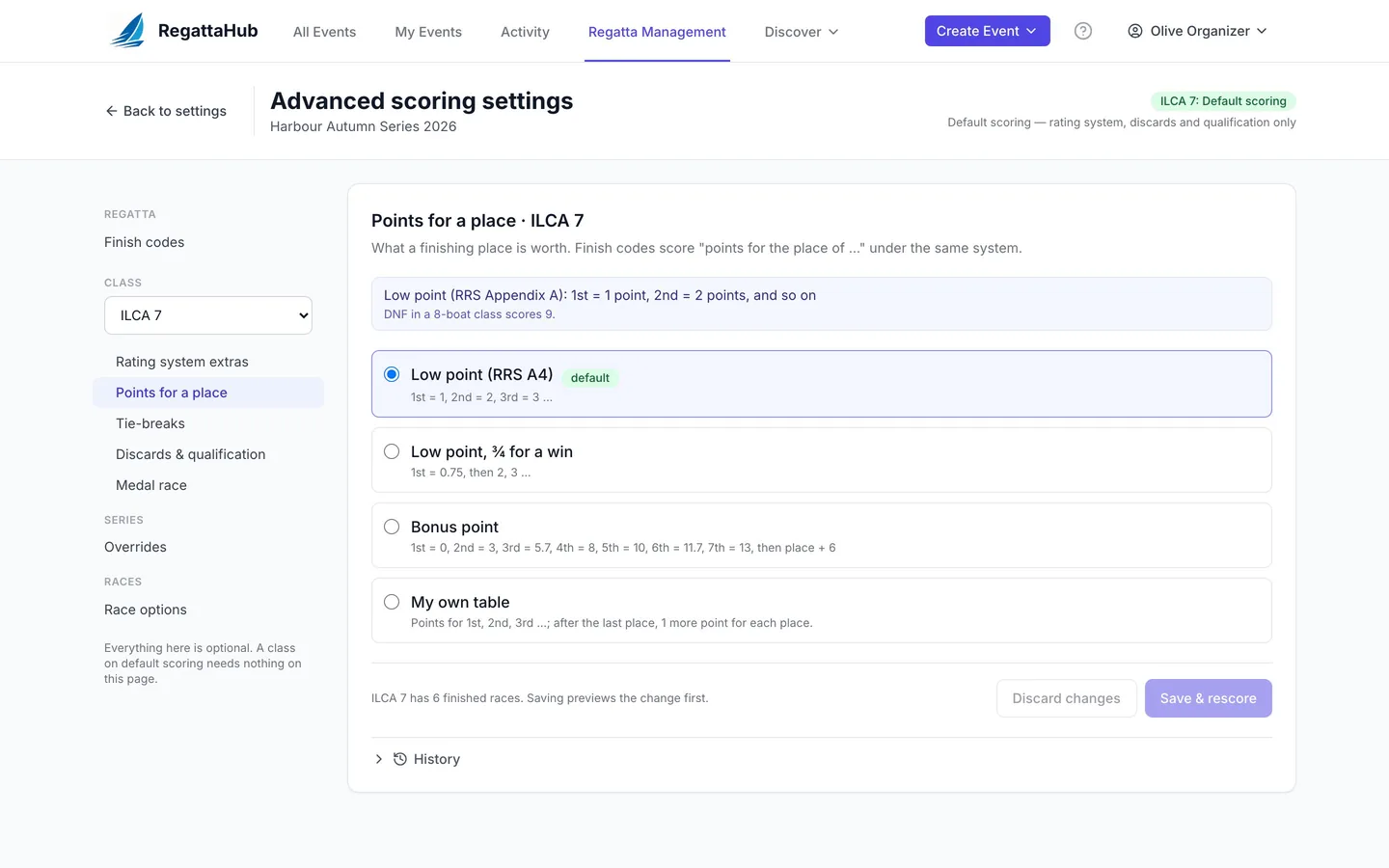
Most regattas need nothing more than the rulebook: low point, a discard or two, and the standard tie-breaks. RegattaHub does that with no setup. A few events need more: a medal race, a club's own finish codes, a Portsmouth handicap, a points table from the sailing instructions. Those live on one page that you only open if you need it.
What "default scoring" covers
A class on default scoring is scored by RRS Appendix A:
- Low point: 1st = 1 point, 2nd = 2 points, and so on.
- Penalty codes (DNF, DSQ, OCS and the rest) scored by the penalty scoring basis you choose in Settings › General › Scoring, such as boats at the start area + 1 (RRS A5.3) or all entries + 1 (RRS A5.2).
- Discards from the class editor, for example first discard after 6 races, then 1 more every 4.
- Ties broken by RRS A8.1, then A8.2.
- The rating system you chose for the class: None (one design), PHRF, ORC, RYA Portsmouth or IRC.
The class editor on the Circles & Fleets tab keeps these everyday settings:
- Rating system: None (one design), PHRF, ORC Single, ORC Triple, ORC 5-band, RYA Portsmouth or IRC.
- First discard after … races and then 1 more every … races, with a caption such as with 6 races: 1 discard.
- Minimum races to qualify: No minimum, At least N races, or At least N % (see discards and qualification).
These are on the Circles & Fleets tab. The class form you use when creating the regatta (and on Edit Event Details) is unchanged: it offers PHRF, ORC and One Design and the older Score drops inputs, so choose RYA Portsmouth or IRC, or a minimum to qualify, on Circles & Fleets.
Where to find Advanced scoring settings
There are two links, one line each:
- Settings › General › Scoring, under race weighting: "Advanced scoring settings — finish codes, points systems, tie-breaks, rating formulas, per-race options. Most regattas never need these."
- A class's results page, in the scoring system note under the standings. This opens the page with that class already chosen.
What is on the page
| Scope | Section | Guide |
|---|---|---|
| Regatta | Finish codes | Finish codes and redress |
| Class (pick one) | Rating system extras | Custom handicaps |
| Points for a place | Points for a place and tie-breaks | |
| Tie-breaks | ||
| Discards & qualification | Discards and qualification | |
| Medal race | Medal races | |
| Series | Overrides (points, tie-breaks, qualification for one series) | Series overrides |
| Races | Race options | Practice races and race options |
The header shows the chosen class's status: Default scoring (rating system, discards and qualification only) or Customized scoring (points tables, tie-breaks, formulas, class-specific codes). A customized class also carries a Customized scoring badge in the class list, and shows Reset to default scoring here.
How saving works
- Every section starts with one sentence describing the current rule, for example Low point (RRS Appendix A): 1st = 1 point, 2nd = 2 points, and so on. It updates as you change things, before you save.
- Problems show inline. An error (a points table that goes down, a formula that can't be read) stops the save; a warning asks you to confirm.
- Press Save & rescore. If the class has finished races, a Before you save preview lists the boats that change rank or net points, and the races that changed. Nothing is saved until you confirm.
- Each section keeps a History with Restore. See preview, history and reset.
What moved, for existing users
- Regattas that used the old regatta-wide throwouts setting were converted to the same discards on each class, so standings did not change.
- The class editor's drop percentage option is gone; classes that used it were converted to the equivalent discard table.
- On the Circles & Fleets tab, the class editor's "Scoring Method" is now called Rating system and offers RYA Portsmouth and IRC, and the discard inputs read First discard after … races / then 1 more every … races. The class form on Edit Event Details is unchanged.
- Boats short of the minimum races are marked DNQ (it used to say NQ).
- Publishing can now be stopped by a scoring warning when a result can't be scored properly, for example a finisher with no rating.
Scoring settings are changed on the web. Medal races, practice races, DNQ and club finish codes are coming to the RegattaHub iPhone app.
Frequently asked questions
Do I need to set anything up to score a normal regatta?
No. Every class starts on default scoring: RRS Appendix A low point, the discards from the class editor, and RRS A8.1 then A8.2 tie-breaks. Advanced scoring settings are only for events whose sailing instructions ask for something different.
Where is the Advanced scoring settings page?
In Settings › General › Scoring, under race weighting, and in the scoring system note on each class’s results page.
What happened to the throwouts setting?
Regattas that used the old regatta-wide throwouts setting were converted to the same discards on each class, so standings did not change. Set discards in the class editor on Circles & Fleets, or in Discards & qualification on the Advanced page.
Will changing a setting change published results?
Only after you confirm. On a class with finished races, saving shows a before-and-after preview of every boat that moves first, and every change can be restored from History.
Can I change scoring settings on the iPhone app?
No, scoring settings are changed on the web. Medal races, practice races, DNQ and club finish codes are coming to the RegattaHub iPhone app.
Related guides
- → Points for a place and tie-breaks Low point, ¾ for a win, bonus point, your own table or a formula in p, and tie-breaks, with worked examples.
- → Medal races: double points and the medal line Choose the race and who sails it; it scores double, can’t be discarded, and the medal line keeps its boats on top.
- → Custom handicaps: Portsmouth, IRC and your own formula RYA Portsmouth and IRC, or your own rating formula in e, r and d with a rating name, usual range and Check panel.
- → Scoring preview, history, restore and reset See who moves before saving, restore any earlier setting from History, or reset a class to default scoring.
First regatta free
No monthly fees. No commitment. Try RegattaHub on a real event at zero cost.
Go to App