How to set discards and a minimum number of races to qualify
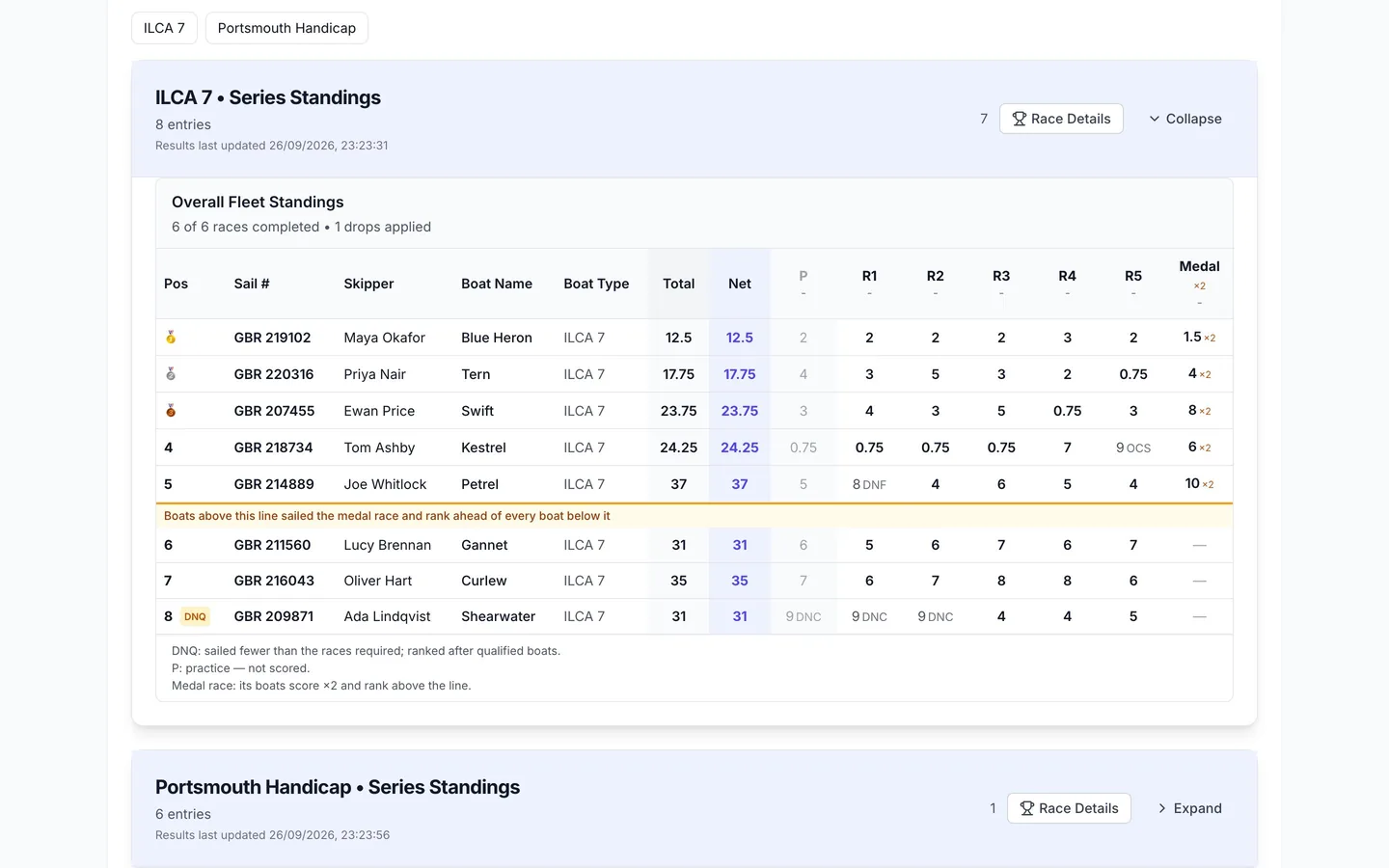
Discards are set on each class: a regular schedule in the class editor, or a table by races completed or formula in Advanced scoring settings. A minimum races to qualify ranks boats that sailed too few races after the rest, marked DNQ.
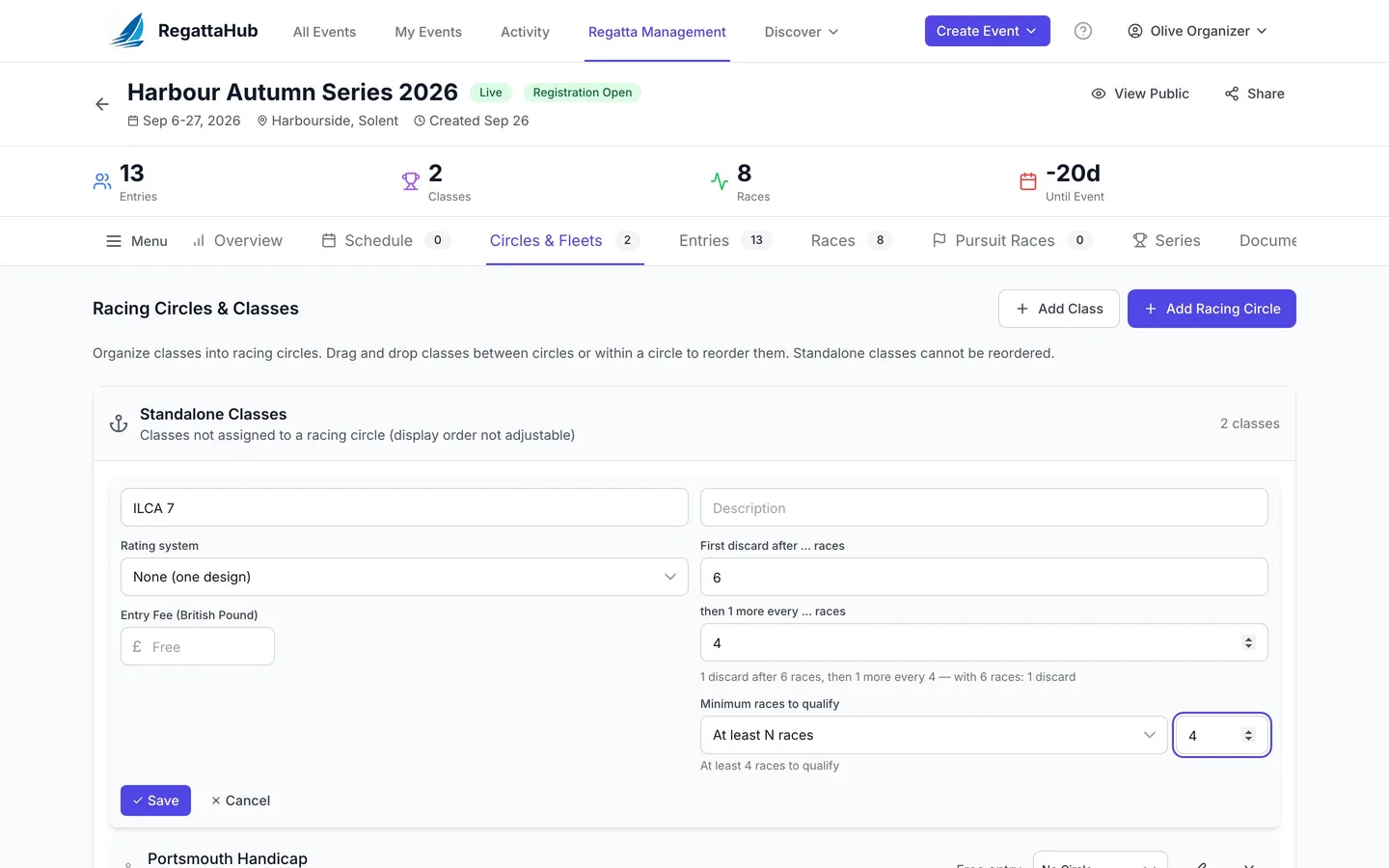
Discards (sometimes called throwouts) let each boat drop its worst scores once enough races are sailed. RegattaHub counts discards from the number of races completed in the series, as RRS A2 does, so every boat in the class has the same number of discards.
A regular schedule (class editor)
Most events need only this. On the Circles & Fleets tab, edit the class and fill in:
- First discard after … races, for example 6, and
- then 1 more every … races, for example 4.
A caption checks your numbers, for example 1 discard after 6 races, then 1 more every 4 — with 6 races: 1 discard. Leave both blank for no discards.
Tables and formulas (Advanced scoring settings)
In Advanced scoring settings, choose the class, then Discards & qualification. The Discards choices are:
- None: every race counts.
- Regular schedule: the same two numbers as the class editor.
- By races completed (table): rows of From race N: D discards. The last row repeats. For example From race 1: 0, From race 3: 1, From race 5: 2 reads No discards until race 3, then 1; from race 5, 2.
- Formula (advanced): discards in terms of
n, the races completed, rounded down.n*0.25gives 1 discard at 4 races and 2 at 8.
Under the choices, a strip shows the discards after each number of races completed, for the races scheduled so far. The rules:
- A rule must always leave at least one race counting: With 1 race completed this rule discards 1 — every race a boat has sailed. A discard rule must leave at least one race counting.
- Discards can stay the same or grow as races are completed, never go down: The table goes down at race 3 (from 2 to 1). Discards can only stay the same or grow as races are completed.
- Discarding more than half of each boat's races is allowed, but you are asked to confirm.
A table and a regular schedule keep the class on default scoring; a formula makes it customized.
Minimum races to qualify
Set it in the class editor, or under Minimum races to qualify on the same Advanced section:
- No minimum: every boat is ranked.
- At least N races, for example 4.
- At least N % of the races completed, for example 50 %: with 8 races completed, at least 4.
- Formula (advanced, Advanced page only): in terms of
r, the races completed, rounded down, for exampler*0.5.
Boats under the minimum are still scored, but ranked below the qualified boats and shown as DNQ, with a note under the results, for example DNQ: sailed fewer than the 4 races required; ranked after qualified boats. A minimum higher than the races scheduled is refused, because no boat could ever qualify:
This rule needs 9 races but only 8 races are scheduled, so no boat could ever qualify.
Series
On the Series tab, each series' discards can be Same as each class, No discards or a Custom schedule, and each series can have its own minimum races to qualify. A series qualification formula is under Advanced scoring settings › Series › Overrides.
Races that count differently
To leave a practice race out of every count, or to stop a race from being discarded, use race options. A medal race cannot be discarded by default and does not count toward the number of discards.
Frequently asked questions
How are discards counted in RegattaHub?
From the number of races completed in the series, as in RRS A2. Every boat in the class has the same number of discards; a boat that missed races simply has fewer scores to choose from.
Where did the regatta-wide throwouts setting go?
Regattas that used the old regatta-wide throwouts setting were converted to the same discards on each class, so standings did not change. Set discards in the class editor on Circles & Fleets or in Advanced scoring settings.
Can I set discards by a table of races completed?
Yes. In Advanced scoring settings › Discards & qualification, choose By races completed (table) and add rows such as From race 3: 1 discard. The last row repeats.
What does DNQ mean in the results?
The boat sailed fewer races than the minimum to qualify. It is still scored but ranked after every qualified boat.
Can the minimum be a percentage?
Yes. Choose At least N % of the races completed. It is compared exactly: 75 % of 6 races means at least 5.
Related guides
- → Advanced scoring settings: what stays default and where What default scoring covers, where the Advanced scoring settings link is, and how saving, previews and history work.
- → Practice races and other race options Practice races that don’t count, races that can’t be discarded, discard-first races and wind bands.
- → Medal races: double points and the medal line Choose the race and who sails it; it scores double, can’t be discarded, and the medal line keeps its boats on top.
- → Setting up high point series scoring in RegattaHub A season-long series with high point percentage scoring, date-based sub-series, discards and automatic race assignment.
First regatta free
No monthly fees. No commitment. Try RegattaHub on a real event at zero cost.
Go to App