How to preview, undo and reset scoring changes in RegattaHub
No scoring change reaches published results unseen. Before saving, a preview shows every boat whose rank or net points change. History records what changed, who changed it and when, with Restore, and Reset to default scoring puts a class back in one step.
The preview: who moves, before anything is saved
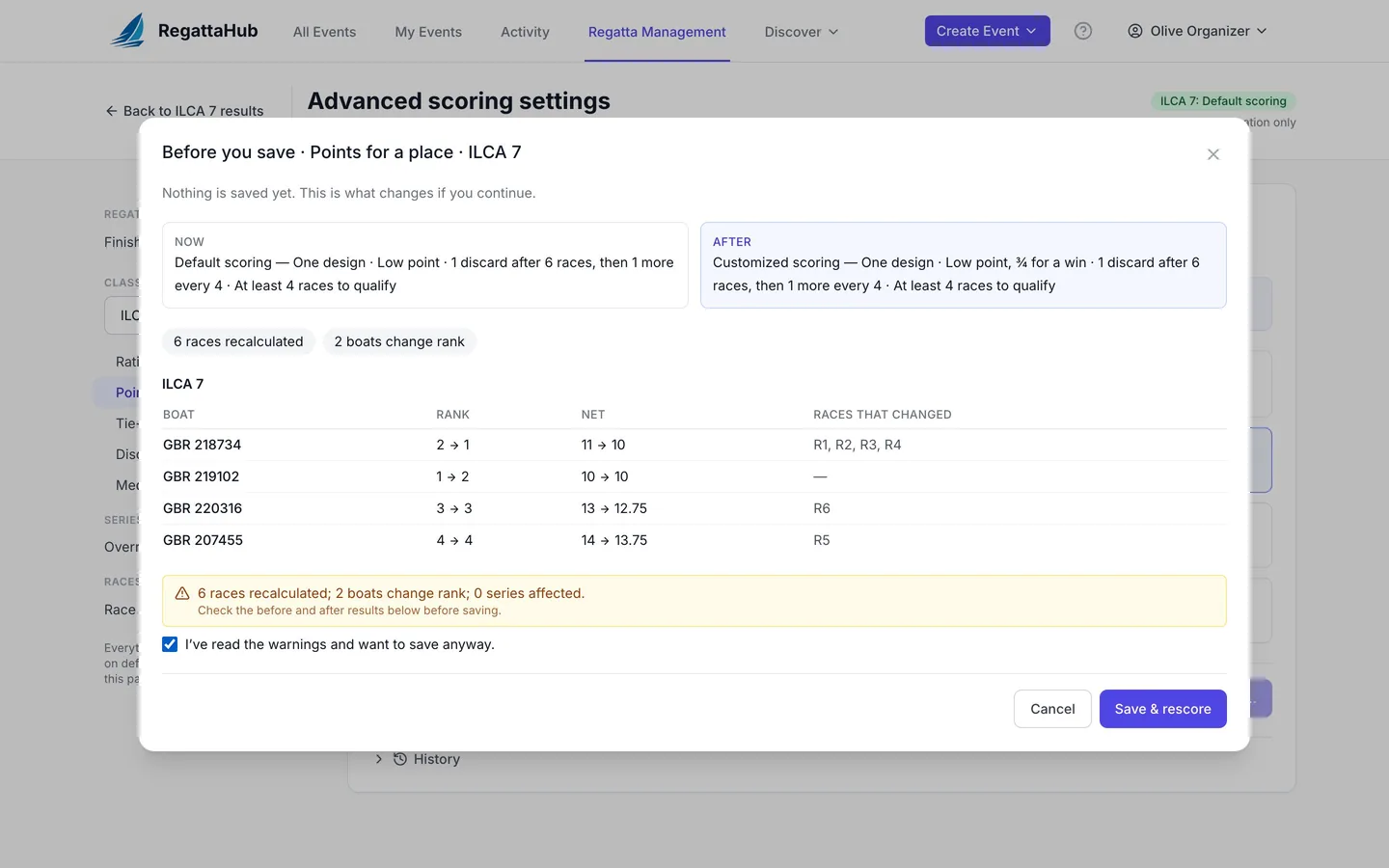
On a class with finished or published races, pressing Save & rescore in Advanced scoring settings opens Before you save. Nothing is saved yet. This is what changes if you continue.
- Now and After: the class's scoring in one sentence each.
- How many races are recalculated and how many boats change rank.
- For each class affected, a table of every boat whose rank or net changes: Boat, Rank (before → after), Net (before → after) and Races that changed.
- Each series, with how many boats change rank in it.
- Any warnings, with I've read the warnings and want to save anyway.
Press Save & rescore to save it, or Cancel to leave everything as it was. Pursuit races are scored separately and are listed as not previewed. On a class with no finished races, saving is immediate: there is nothing to move.
The same preview appears when you change race options on a finished race, restore from History, or reset a class. If someone else saves the same settings while you are editing, RegattaHub asks you to reload rather than overwrite their change.
History and Restore
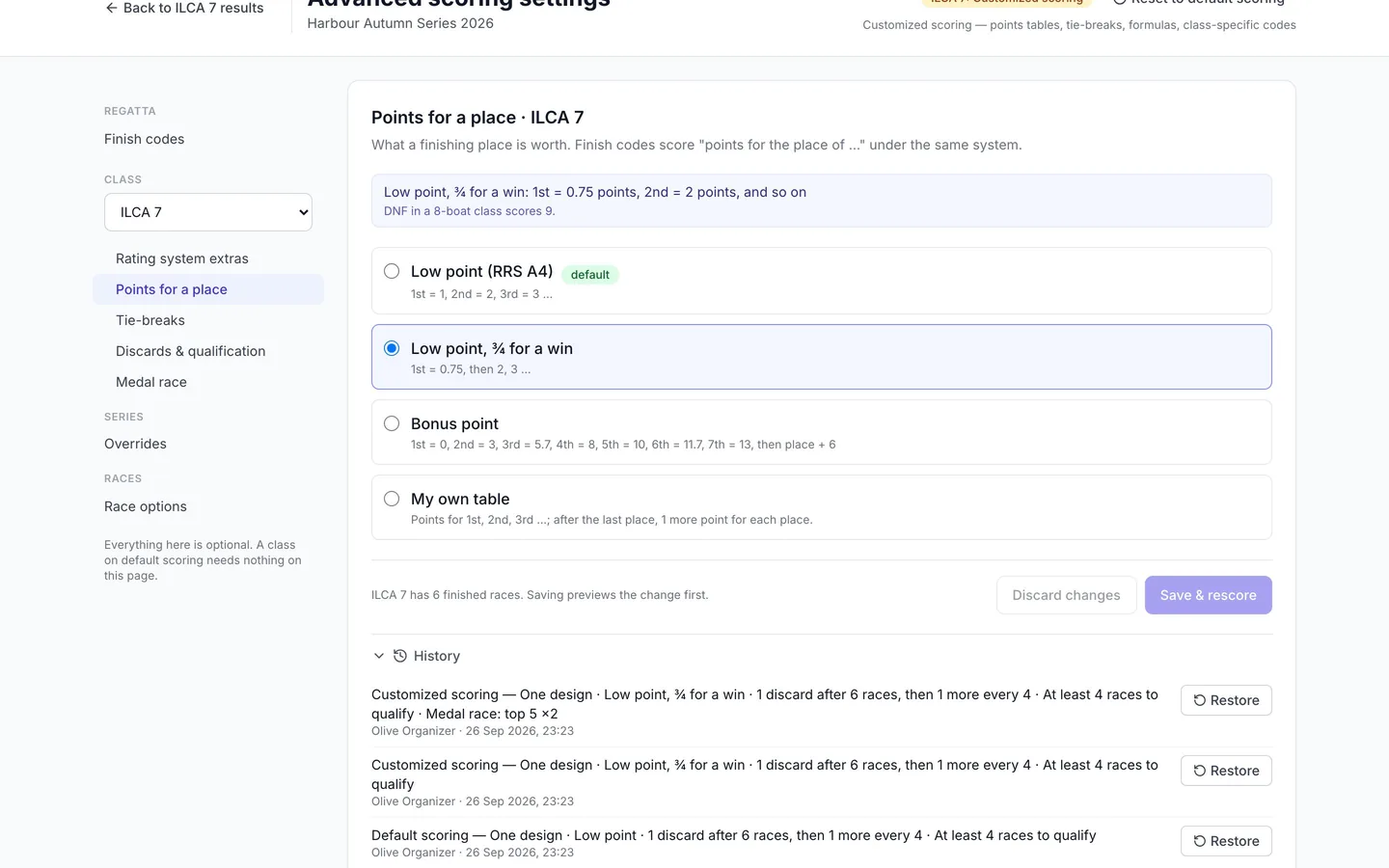
Every section of Advanced scoring settings ends with History. Expand it to see each change: the scoring after it, who made it, when, and how many warnings were accepted.
- Find the change you want to undo.
- Press Restore to put back the setting from before that change.
- Check the preview and confirm. The restore is itself recorded in History.
Reset to default scoring
A class on Customized scoring shows Reset to default scoring in the page header.
- Press Reset to default scoring.
- The dialog lists What happens, for example Points for a place go back to low point (1st = 1, 2nd = 2 …) and The medal race is removed, and what is Kept: the rating system, the discard schedule or table, the minimum races to qualify, per-race options and every result entered.
- If a series overrides this class's scoring, you can choose to reset that series too.
- Confirm. The class's finished races are recalculated once, after a preview.
A reset is refused while finishes in the class still use a code that exists only for that class; change those finishes first. A reset also appears in History, so it can be restored.
Frequently asked questions
Can I see what a scoring change does before saving it?
Yes. On a class with finished races, Save & rescore opens a Before you save preview listing every boat whose rank or net points change and the races that changed. Nothing is saved until you confirm.
How do I undo a scoring change?
Open History at the bottom of the section and press Restore on the change. You see the same preview before it is saved.
How do I go back to standard scoring?
Press Reset to default scoring in the page header. The dialog lists exactly what goes back and what is kept, and the class’s results are recalculated after a preview.
Does a reset delete my results?
No. Results, the rating system, discards, the minimum races to qualify and per-race options are kept. Only the customizations are removed.
Related guides
- → Advanced scoring settings: what stays default and where What default scoring covers, where the Advanced scoring settings link is, and how saving, previews and history work.
- → Points for a place and tie-breaks Low point, ¾ for a win, bonus point, your own table or a formula in p, and tie-breaks, with worked examples.
- → Medal races: double points and the medal line Choose the race and who sails it; it scores double, can’t be discarded, and the medal line keeps its boats on top.
- → Scoring warnings: why publishing can be blocked What stops a race from being published, what the warnings mean, and how to fix them.
First regatta free
No monthly fees. No commitment. Try RegattaHub on a real event at zero cost.
Go to App